

Many organisations operate mixed fleets with different vehicles and multiple device types.
Using a modular platform makes it easier to standardise installations while still allowing flexibility where needed. Maintenance becomes simpler, spare parts are easier to manage, and new deployments can be completed more efficiently.
Standardisation does not necessarily mean every installation needs to be identical.
A better objective can be to standardise the platform and component families while allowing individual configurations to vary according to the vehicle or role.
For example, an organisation might use the same RAM ball size and arm system across its fleet while selecting different bases and holders for individual vehicle and device combinations.
This can reduce the number of completely different mounting systems that procurement, operations and maintenance teams need to support.
Built Around Three Simple Components
Rather than relying on one fixed mounting assembly, RAM® Mounts systems can be configured using three key components:
- Base – Attaches securely to the vehicle, workstation, or other surface.
- Arm – Connects the system and provides adjustable positioning.
- Holder – Secures the mobile device, tablet, or phone.
The advantage is that each component can be selected separately.
A forklift and a service vehicle might use the same tablet but require completely different mounting bases. Likewise, one installation may require a short arm to minimise movement, while another needs additional reach or positioning flexibility.
This allows businesses to standardise around the RAM® mounting platform while still configuring each installation around the vehicle, equipment and worker.
Why Interchangeable Components Matter
The mounting location does not have to change simply because the device changes.
Likewise, changing the vehicle or workstation does not necessarily mean every component of the existing setup becomes unusable.
This interchangeability is one of the biggest advantages of using a modular platform, particularly when equipment is deployed across more than one vehicle or location.
Configure the Mount Around the Job
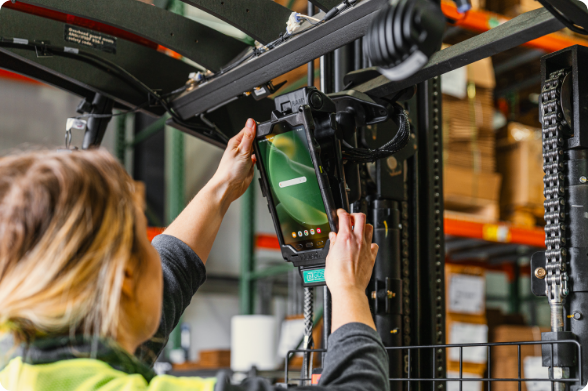
Different workers interact with technology in different ways.
A delivery driver may need a phone positioned clearly for navigation. A forklift operator might require a rugged tablet that remains visible while staying securely mounted during regular vehicle movement. A field technician may need to reposition or remove a device several times throughout the working day.
For that reason, the first question should not always be:
“Which holder fits this device?”
A more useful question is:
“Where and how does the worker need to use the device?”
The answer can influence mounting location, base type, arm length, holder design, charging requirements, and how easily the device needs to be removed.
Other factors include:
- Where the device needs to be positioned
- Whether it will be operated while seated or standing
- How frequently the device needs to be removed
- Whether workers will be wearing gloves
- Whether charging is required while mounted
- How much vibration the installation may experience
- Whether the setup needs to be replicated across multiple vehicles
Start With the Mounting Location
The holder is usually the most noticeable part of a device mounting system, but choosing it first can limit the overall installation.
Start by identifying where the device needs to sit.
From there, consider the most appropriate mounting base, the amount of adjustment required, and finally the holder that matches the device.
This approach makes it easier to create a mounting solution around the workflow instead of forcing the workflow to fit the mount.
“One of the most common mistakes we see is choosing the holder first and working backwards. We generally recommend starting with where and how the device needs to be used, then selecting the base, arm and holder around that workflow,” said Richie Aitsi, Product Specialist at Mounts New Zealand.
Why a Modular Mounting System Is Easier to Upgrade

Mobile technology rarely stays the same for long.
Phones and tablets are replaced, rugged devices are upgraded, vehicles change, and operational requirements evolve.
With a modular mounting system, changing a device does not automatically require replacing the complete mounting assembly.
In many situations, the existing base and socket arm can remain installed while the device holder is replaced with one designed for the new hardware.
For a single vehicle, that can make an upgrade quicker and easier.
Across dozens or hundreds of installations, the potential benefits become much greater.
Replacing complete systems can involve new hardware, installation labour, vehicle downtime and operational disruption. Retaining compatible components can reduce the amount of hardware and installation work required during future technology refreshes.
Plan for the Next Device
When selecting a mounting system, it is worth thinking beyond the device currently being purchased.
Consider whether the mounting platform will provide options if the organisation moves to a different tablet, phone or rugged device in several years.
A flexible platform can help extend the useful life of the mounting infrastructure even when the technology attached to it changes.
Designed for Everyday Use
A professional mounting system needs to do more than simply keep a device off the dashboard or work surface.
It should provide:
- Secure device retention
- Easy adjustment
- Stable positioning during regular operation
- Fast installation and replacement
- Reliable performance in demanding environments
For business and enterprise deployments, another important factor is repeatability.
A mounting configuration that works successfully in one vehicle is useful. A configuration that can be documented and replicated consistently across 20, 50 or 100 vehicles is much more valuable.
Installation position, arm length, orientation, cable routing and component selection can all be documented so future installations follow the same standard.
Standardisation Across Vehicles and Worksites

Businesses often operate different vehicle models, machinery and device types.
Trying to use one identical mounting configuration everywhere may not be practical.
Instead, organisations can standardise the mounting platform and component families while allowing individual configurations to change depending on the application.
For example, the same RAM® ball size and arm system could be used across a fleet while different bases are selected for individual vehicle types and different holders are used for each mobile device.
This approach can simplify purchasing, spare-parts management, installation, and maintenance without removing the flexibility needed for different working environments.
A Question Worth Asking Before a Large Deployment
Before approving a mounting configuration, ask:
“If we replace this device in two or three years, how much of the current mounting system are we likely to keep?”
That question changes the way a mount is evaluated.
Instead of considering only the upfront price, it encourages businesses to think about installation life, future upgrades, replacement hardware, and the longer-term cost of supporting mobile technology.
A Smarter Long-Term Investment
The value of a mounting solution should not be measured only by how securely it holds today's device.
It should also be measured by how easily the system can adapt when devices, vehicles or workflows change.
By separating a mounting system into interchangeable bases, arms and holders, businesses gain more flexibility to update individual parts of an installation instead of automatically replacing everything.
For organisations deploying mobile technology across fleets, warehouses, field operations or other demanding environments, this modularity can help simplify maintenance, support consistent installations and make future hardware upgrades easier to manage.
For a small deployment, that may simply mean replacing a holder instead of an entire mount.
Across a larger operation, the same flexibility can influence procurement, installation time, maintenance requirements and the total cost of managing mobile technology over its working life.
Build a Mounting System Around Your Operation
Looking for a mounting solution that can adapt as your devices, vehicles and workflows change?
Mounts New Zealand offers RAM® Mounts bases, socket arms, phone and tablet holders, vehicle mounts and complete mounting solutions for a wide range of commercial and industrial applications.
Explore the RAM® Mounts range at Mounts New Zealand or contact our team for help configuring a mounting system around your devices, vehicles and working environment.
Common mistakes to avoid
Do not choose a tablet mount without checking the tablet case and charging setup. Do not use a temporary base for a high-traffic POS counter if a fixed base is more appropriate. Do not use an arm that is longer than needed.
Also avoid positioning the screen where it creates customer confusion or staff discomfort. A good mount should support the workflow, not slow it down.